
Barcodes Instruction

How to generate WCL barcodes

As of December 1st 2018, for better tracking and faster processing of all our customers cargo, we have implemented a barcode system to improve our tracking system. The barcode must be placed on 2 sides of the master carton by your manufacturer overseas during production.

Any cargo entering our warehouse without a barcode will be billed an additional fee $0.70/label (minimum $150).

The barcode number should match the packing list. Please use the link below as reference: DetailedPackingList.xls

Here are the instructions on "How to add barcode to your Master / Shipping cartons":
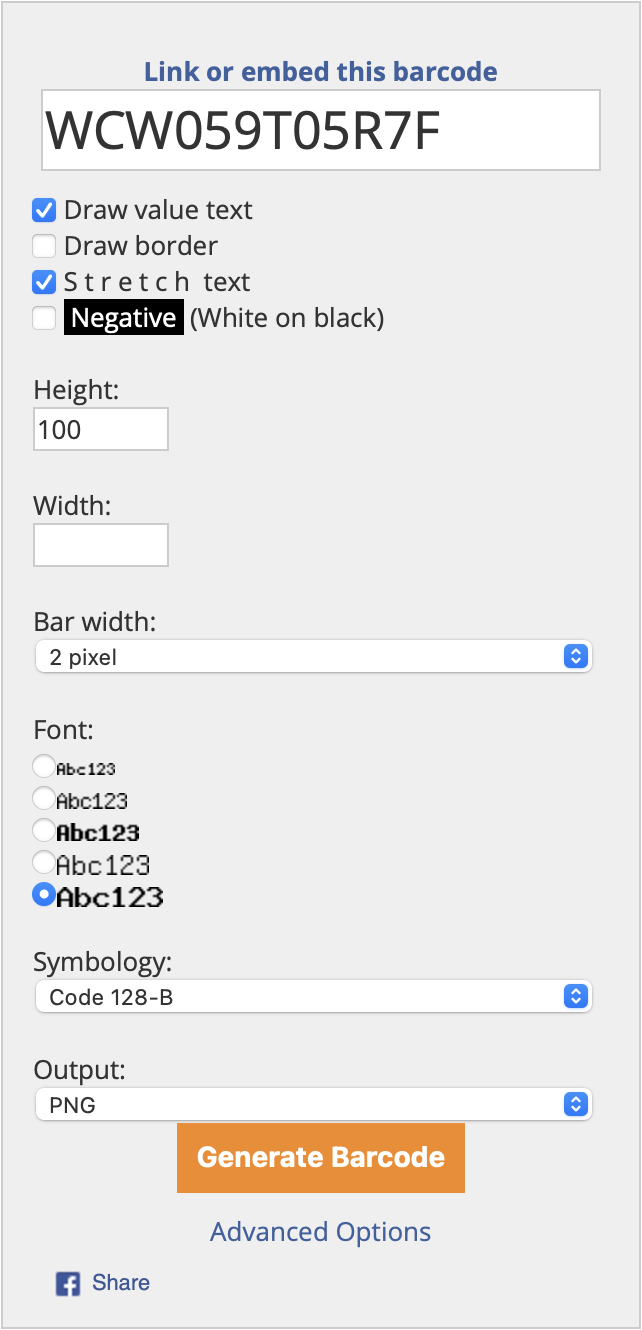
Follow these step to generate your WCL barcodes:
  • 1. Enter this weblink: http://www.barcodesinc.com/generator/index.php
  • 2. Enter the barcode in the textbox: WC + Your FNSKU or UPC
  • Make sure to add "WC" and do not just add your FNSKU# or UPS number on the master carton only
  • By adding WC, Amazon or other company cannot scan this barcode but if we look at the end of the code, we can confirm what is inside
  • 3. Click "Advanced Options"
  • 4. Check "Draw value text"
  • 5. Check "S t r e t c h text"
  • 6. Height 100
  • 7. Bar width 2 pixels
  • 8. Font the largest font at the very bottom
  • 9. Symbology Code 128-b
  • 10. Output PNG
  • 11. Click the "Generate Barcode" button
  • 12. Save the image and give it to your supplier to place it under your carton markings "Made in China". All Master cartons must be barcoded on 2 sides
barcodes
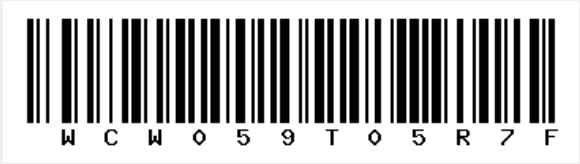
Label example:

The barcode generator only creates the WCL at the bottom of this label and not the label as whole.
Company: Worldcraft Logistics
Product Name: Red Shoes
FNSKU/SKU (optional): W059T05R7F
50 units
CTN Weight: 20 KGS
Dims: 50 x 50 x 50 cm
Made in China (country of origin)
WCL Barcode:
barcodes

Note: Barcode width cannot be under 2 inches (5 cm) because it is too small. Barcode width cannot be over 4 inches (10 cm) because it is too big